The HBA's 2026 annual theme is "Future Focused. Impact Driven." Please see the resource below, which contains an overview and other information to assist with programming and content development to align with this theme.

For ease of event setup, HBA has developed the below two-step guidance to ensure the speaker administration pieces are taken care of in a timely manner.
Step 1: immediately upon confirmation of the speaker's participation and before setting the event up for registration...
Request that the speaker create an HBA account or update their current HBA account (please note, links below go direct to our front-facing HBA Help Center so can be shared directly with the speaker)
- Create an HBA account (if they don't already have one). They do not need to become a member and can just create a guest account. Once they create their account, please inform them that they will need to complete the tasks listed in step 2 below. OR
- Update their HBA profile (if they already have one), specifically:
- Add or edit their profile picture if needed
- Ensure their title and company information is accurate
- Add a link to their speaker bio
- While in their profile, complete the HBA Speaker Agreement. If they have completed their speaker agreement, it will be reflected in the event's registration report once they have registered. *This only needs to be done once per calendar year.
Why is this?
During the event setup process, HBA's system pulls your speaker's information directly from their existing HBA profile. If they do not have an HBA profile, you will not be able to add them to your event; or if their profile information is out of date/inaccurate, it will appear that way on your registration page.
HBA staff are not allowed to edit speaker profile information (such as their title, company) or add anything to their profile (such as a headshot or speaker bio) per HBA policy and GDPR regulations. We rely entirely on the individual to ensure their profile information accurate.
For these reasons and to ensure you are not held up during the planning process, it is very important that speakers all have accurate HBA profiles before you even begin the event setup process. If a speaker is not willing to do the above steps, please let them know that, unfortunately, they will not be able to participate in the event as a speaker.
Step 2: once your event is open for registration...
HBA will notify you and send you all your promo codes. At that time, prompt your speaker to register for the event using the HBA speaker code. Here are instructions, should they need assistance registering:
- Registering for an HBA event
- Registering someone else for an HBA event (if they have an assistant, etc registering them)
- Using a promo code
Once these required administrative items are complete, you should be able to focus on ensuring the speakers are prepared for the live aspects of the event.
This external help article has been developed for speakers - please feel free to share it with them!
Speakers can now acknowledge the agreement in their HBA profile by following the steps below. This only needs to be completed once per calendar year as it satisfies the need for a signed agreement for all chapter, regional, and affinity group events.
- Log in to their HBA profile (note: HBA membership is not a requirement to have an HBA profile. If a profile needs to be created, that can be done so here in just a few minutes.)
- In your HBA profile, navigate to the left-side purple navigation bar. Select "Speaker Agreement Form":
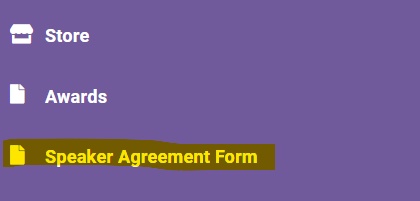
- From the following screen, click "submit" to agree to the calendar year indicated:

Once a speaker has been registered for an event, the attendance report will show if they have signed for the year.
The HBA's education staff has helpfully provided the below resource suggesting the current 3 L&D Priorities to consider in developing your education strategy:
L&D Priorities for 2026 from HBR.pdf
